

An AI coding agent in Linear that comes with its own developer.
Assign a Linear issue to Ponte Digital, and you get back a pull request, a preview link and review notes in the issue thread. A developer checks every change before you see it.
A Linear workspace admin starts the install (on Enterprise plans, a workspace owner), and setup takes five steps.
Ponte Digital is a development team in Tilburg, the Netherlands, for small SaaS and IT-services companies with more customer requests than developers. We build at AI speed, a developer checks every change, and the work stays in your own Linear and GitHub.


Each lane works one issue at a time, in the order you choose, so we don't replace a team. You need a GitHub organization and a preview environment on Vercel.
Every other coding agent in Linear hands its pull request to your developer. Ours comes with one.
Ponte Digital's agent comes with one of our developers, who checks every change before you see it. On 15 October 2026, none of the coding agents in Linear's directory said a developer of its own reviews the work before you see it.
A developer comes with it.
GitHub's Copilot agent for Linear opens a draft pull request and requests a review from you. Ours reaches you after a human review by one of our developers.
-
You test the real thing, not code.
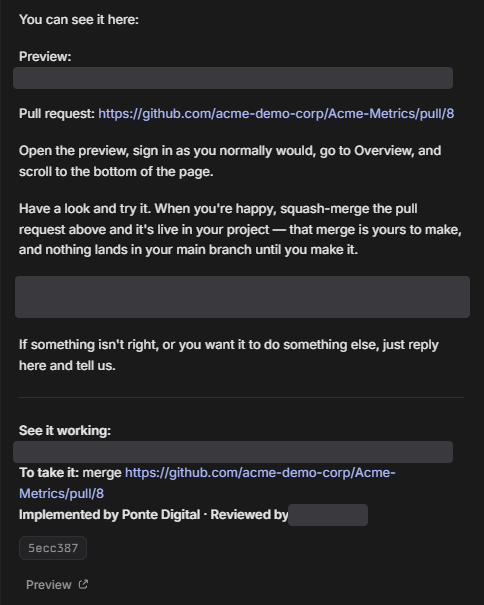
Every change comes with a link to a preview of your own app, on non-production data with test accounts. You test it like your users will.
-
Your history stays in your own tools.
The scope, the questions, the review notes and the pull requests live in your own Linear and GitHub. If you stop, every record stays with you.
-
Nothing starts without your yes, and nothing goes live without your click.
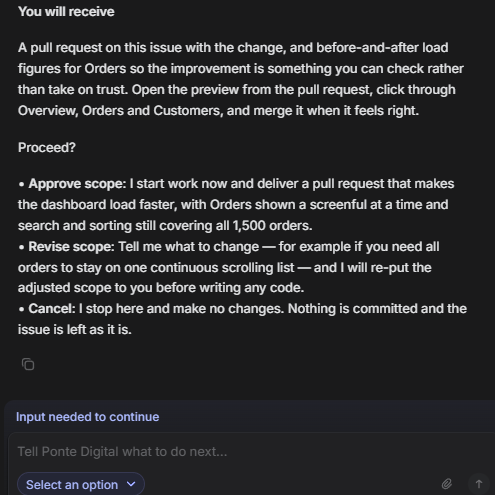
We confirm in plain language what you'll get before any work starts. You merge it yourself. We never push to your main branch.
-
We never touch production or real customer data.
We work on a branch and in your preview, on non-production data. Merging and deploying stay with you, and we never ask for your production keys.
You assign an issue, and everything comes back in its thread.
Ponte Digital answers in the issue you assigned: first the scope, then the pull request a developer has checked. Your active request comes back within 48 hours on weekdays, counted from when you approve the scope.
-
You assign an issue to Ponte Digital: press A on the issue and choose it.
To ask something first, mention Ponte Digital in a comment. It only has access to the Linear teams your workspace admin chose.
-
We confirm what you'll receive before work starts.
If a request is vague or too big, you get questions or a proposed split first. Nothing starts without your yes.
-
We build it at AI speed, on a branch in your own repository.
The branch deploys to your preview environment, on non-production data. You can follow it in the issue's plan panel: Scope agreed, In development, Ready for your review, Merged.
-
A developer runs the preview and checks the change against what was agreed.
One of our developers also reviews the code.
-
You get the pull request, the preview link and review notes in the same issue thread.
Every delivery is signed: who built it, who reviewed it, what changed and why.
-
You merge it yourself. We never push to your main branch.
-
You can ask about a delivered change or request an adjustment in the same thread.
Feedback on delivered work jumps to the front of the queue.
-
Each workspace has its own queue.
Each lane works one issue from it at a time, in the order you choose.
Installing it takes five steps: one in Linear, one in GitHub and three in the Ponte Portal.
Ponte Digital installs in five steps. A Linear workspace admin starts in Linear, because workspace admins install agents, and the Ponte Portal walks you through the rest.

 In Linear
 -
A Linear workspace admin installs Ponte Digital and chooses which teams it can access.
Linear shows the admin these five permissions:
- “Assign issues and projects to the app in teams it can access”
- “Mention app in issues, projects, and documents it can access”
- “Read access to your workspace”
- “Receive realtime updates about your workspace”
- “Write access to your workspace”
In plain words: Ponte Digital can see the teams you grant it, and Linear tells it about every change there. We use only what the issues you assign need, plus who your members, admins and teams are.
Linear doesn't count agents as billable seats (Linear's docs).
- Developer
- Ponte Digital, Tilburg, the Netherlands. KvK 42036253.
- Contact
- hello@pontedigital.co
- Terms and privacy
- Our terms and privacy statement
- Removing it
- What happens when you remove it
After you approve, our install page links you to the Ponte Portal. Sign in with the email you use in Linear.
-
Accept our terms.
Until an admin does, we read no issue and copy no repository. Issues assigned before then wait, and start on their own. Read our terms and privacy statement first.
-


Install the Ponte Digital GitHub App on the repositories you choose.
The portal opens GitHub's install screen, and someone who owns your GitHub organization approves it. We then link the install to your workspace by hand, usually within the hour on working days.
Choose only the repositories you want us to work on. The app asks for read and write access to code, pull requests and workflows, and read access to deployments and metadata.
-
Connect each Linear team to the repository its issues are built in.
With one team and one repository, the portal connects them for you.
-
Choose a plan.
Work starts with the First Issue, one real request at a one-time price. The prices are on our pricing page.
Optional: turn on three settings in Linear (code access in Linear's GitHub integration, each reviewer's GitHub account linked, code reviews on). Then each delivery opens on its issue as a diff you can read, comment on and merge. Reviewing on GitHub always works.
Then assign it an issue: open the issue, press A and choose Ponte Digital. A person stays the assignee (Linear assigns you if no one is), and Ponte Digital becomes the delegate. Within seconds it answers in the issue, then posts the scope for your yes.
It needs a GitHub organization and a preview environment on Vercel.
To use Ponte Digital in Linear, you need a GitHub organization you can install an app on and a preview environment on Vercel. It isn't for companies that need three or more full-time developers, or that don't have a product yet.
What you need
- A GitHub organization you can install an app on.
- A preview environment on Vercel that deploys each branch and points at non-production data with test accounts. If you don't have one, setting it up is the first thing we do together.
- Your default branch protected in GitHub, so changes only arrive through a pull request.
- A Linear workspace. If you don't use Linear yet, we set it up with you.
Who it's not for
- You need three or more full-time developers. Hire them.
- You don't have a product yet. Start with Build & Run instead.
- You're an unfunded startup.
Ponte Digital in Linear is a paid monthly service.
It runs as a Ponte Digital lane, a fixed-price development subscription. The prices, all excluding VAT, are on our pricing page.
Your first lane starts with the First Issue, one real request at a one-time price, so you can try us first. It starts once setup is done and your preview environment works.
Questions about Ponte Digital in Linear.
Every answer here describes how Ponte Digital works in Linear today. Questions about lanes and billing are on the lane and pricing pages.
-
Who can install Ponte Digital in Linear?
A Linear workspace admin installs Ponte Digital, or a workspace owner on Enterprise plans. During the install, the admin chooses which teams it can access.
After that, people on those teams assign it issues, and mention it in a comment to ask a question.
-
What happens to our code?
It's yours, and it lives in your own GitHub, so nothing is locked away on our side. We work on a branch in your repository and open a pull request. You merge it yourself. We never push to your main branch.
The Ponte Digital GitHub App works only on the repositories you grant it. It asks for read and write access to code, pull requests and workflows, and read access to deployments and metadata.
-
What if a delivered change isn't right?
Say so in the same issue thread. You can ask about a delivered change or request an adjustment there, and feedback on delivered work jumps to the front of the queue.
You merge it yourself. We never push to your main branch.
-
What happens if we remove Ponte Digital from Linear?
Nothing breaks. Your code and pull requests stay in your own GitHub, and your issues stay in your own Linear.
If you remove it, we keep your workspace as it is for a grace period and charge no renewal. Reinstall before it ends and you carry on where you left off. If you don't, your account closes, and we uninstall our GitHub App where it served only your workspace.
Our GitHub App is a separate install. To end our access to your code at once, uninstall the Ponte Digital GitHub App in your GitHub organization's settings.
Your plan's terms are on the pricing page.
-
What do you keep of our code and issues?
We keep copies only to build and review your issues, and we delete them on a schedule set out in our terms. We don't use your code, issues or other material to train or fine-tune AI models, and we don't let anyone else do so.
On our servers we keep a copy of each repository we work in while your account is open. We also keep a working copy for each issue until that issue is done.
For our reviewers we keep a copy of each issue in our own Linear workspace. We also keep your repository's history up to each branch we build, in a private repository in our own GitHub organization.
An account admin can download your record, or delete everything at once, from Settings in the portal.
After the install, your next issue comes back checked by a developer.
A Linear workspace admin installs Ponte Digital and chooses which teams it can access. After the other four setup steps, you assign it an issue.
Install in LinearBook a call if you'd rather talk first.
Last updated: